Building a permissions system our Pros didn’t ask for.
Customers begged for more roles. We deleted them instead.
“More granular permissions” sat near the top of our most-requested list for years, then it was never spoken of again.
2 → 0
Fixed roles in the model. We removed the role metaphor entirely instead of adding more — pros now compose access directly.
0 → 7
Feature areas a pro can scope independently — chat, financials, files, and more — where there used to be one arbitrary line.
1 click
To apply a reusable Permission Set, so per-user granularity never became per-user busywork.
“What can this user access?” — one question, seven answers, no roles to interpret.
The Problem
Two roles weren’t a system, they were a cop-out.
BuildBook is where construction pros run their projects - budgets, schedules, finish selections, daily logs, the works. The team for each project is different, depending on scope, timeline, and subcontractor availability. The pro might want a bookkeeper who can see financials and nothing else, a subcontractor who can see tasks but not pricing, a client who sees only what’s shared with them. This causes a lot of complexity in who needs access to what, and in which context.
BuildBook’s permission system consisted of two blunt roles: full access or limited access, with an arbitrary line between them. For years, requests along the lines of “can you create a role that does x and y, but not z?” flooded our support team’s inbox. The existing roles were so painful that they cost us customers.
- “It’d be nice to have a bit more granularity with the permissions. I’d love for my PM and team members to be able to view the customer selections but not have access to the financials.”
- “I just need subs to only see tasks assigned to them. PLEASE!!”
- “Is there any way to give someone ‘full access’ but not be able to see the budget section? … The budget part of the project is the only thing I’d like to keep private.”
- “I can’t use BuildBook with clients how it is currently set up… until you roll out the new changes, I’d like to pause my subscription, cancel it, or get credit.”
But the complete non-starter with all of these requests: every pro wants to configure access differently.
So how do we make everyone happy?
The answer wasn’t more roles. It was no roles... For now.
More roles would have meant more arbitrary lines. Every new role would be another guess at how someone else’s business is structured, and another thing for a pro to learn. Creating enough roles for everyone to have what they wanted would have resulted in hundreds of configurations. That’s not a solution.
A better alternative would be to just let each pro configure roles that worked for their team. That would keep the clutter down, but only to an extent. Even with custom roles, there would be exceptions within each organization where the pro would need to create one-off roles for specific people or for specific projects. So the clutter starts accumulating.
So we removed the role paradigm entirely so we could allow pros configure access directly. Each area of the app became its own permission, set in plain language under a single question - “What can this user access?” Each area came with a simple set of options, and the combination of which would cover nearly every request we had heard, plus some. The total number of configurations available is math I can’t do. But it’s a lot.
Map it out
So what do they actually need?
As I mentioned, we had a laundry list of requests from pros asking for specific controls. We needed to parse through those requests and organize them into granular controls we could actually support... without AI. Yikes.
I took the list of requests our support team had collected over recent months. I slotted each request into an affinity map, organized by the type of user it would target and the feature area of the app it would affect. From there, I could see which requests were the most common, and I could gather a sense of what this new system needed to offer.
Affinity map identifying the granular controls we needed to provide pros
Toggle features on/off
Draft before publishing
Hide/share costs
Sharing
Edit selections
Relevant info only
Tasks & schedule
Miscellaneous
Breaking down the pieces
All we had to do now was break down the entire app into separate, configurable slices. Piece of cake.
I took the findings from the affinity map and translated them into this permissions matrix, listing the areas/features of the app by row and the permission by column. There were also general rules-of-thumb I spelled out so nothing would break or conflict.
Permissions structure matrix
General Rules:
- To edit something, you must have view access
- To comment, share, mark complete, or change status, you must have view access
- You can always edit or delete your own comments
- If you can view, you can export
Access will be toggle-able per user
Access will be controlled by another rule
Doesn’t exist
The unlock
Granularity creates busywork - so we made it reusable.
Here’s the trap with granular controls: the moment access is per-user-per-feature, creating and maintaining your users becomes a chore. Configuring seven dropdowns for every bookkeeper, every sub, every client, on every project. We’d have traded one complaint for a worse one.
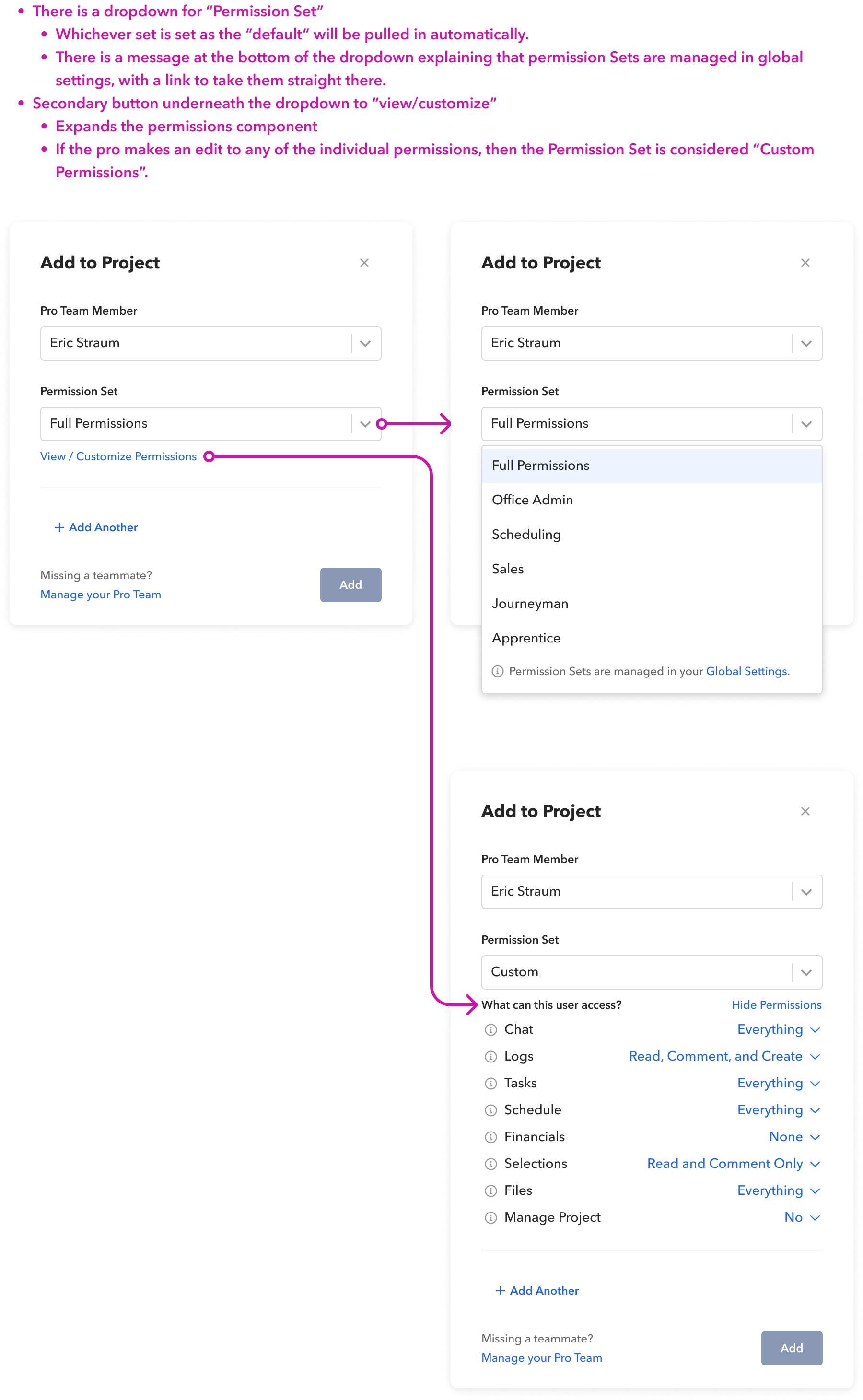
So the real design wasn’t the dropdowns; it was the layer above them. We introduced Permission Sets: named, reusable bundles a pro defines once (“Bookkeeper,” “Lead carpenter”) and applies in a click. Two sensible defaults shipped in every account: Full and Minimum, so the basic cases needed zero setup.
You may be thinking “that’s just roles, redesigned”, in which case you’d be correct. The difference is in the details and the mental model. Designating this system “permission sets” rather than “roles” is descriptive without coming with the baggage of how users expect roles to work. It also leaves the door open to per-user-per-project configuration, which we called “Custom” permission sets. In these cases, the pro had the option to just ditch their predefined permission sets and select the set of permissions that made sense in their unique circumstance. Again, without having to create a reusable, labeled permission set.
Custom, optional “roles” - managed by the organization itself, for its unique needs.
Reusable settings raise sharp edge-case questions, and each one was a deliberate call: editing a permission set propagates to everyone who has it (with a warning banner, because that’s a loaded gun); deleting a set doesn’t strip anyone’s access, those users’ permissions are transferred to “Custom” sets and leaves their permissions untouched; and tweaking one person’s access from a saved set quietly drops that person to Custom rather than mutating the set for everyone. The model had to be powerful without ever surprising someone with access they didn’t expect.
The outcome
The users went quiet... in the best possible way.
After it shipped, “more granular permissions” went from one of our most-requested improvements to never coming up again. Not because we stopped listening, but because the problem was actually gone. The clearest signal a feature is right is the silence that follows it.
The honest version: I’d have loved a clean before/after funnel here, and the team set baselines to chase one. But the outcome that mattered was qualitative and unambiguous — the loudest standing request in the product simply dissolved.